Elasticsearch Pinned Query Does Not Work Like I Expected

Discovering that Elasticsearch Pinned Query only boosts documents to the top of page 1, not across all pages, and building custom in-code pagination instead.
In this post
The feature I was building
So I was working on a search feature where we need to boost certain item in the search results. Think of it like sponsored or featured listing in a job board or marketplace, you want to mix promoted items with organic results at some fixed ratio, like showing 1 promoted item for every 2 organic result. Pretty straightforward requirement, right?
The promoted items had specific rules: they had to be active, have low visibility, like less than certain impression threshold, and posted recently enough that they deserve a boost. We had an hourly scheduler that would refresh which items qualify for promotion. The logic for deciding which item get promoted was already clear, so I was thinking the hard part is just how to actually mix them into the search result on Elasticsearch side.
Why I thought Pinned Query would work
When I was searching around for how to do this, I found out that Elasticsearch has something called Pinned Query. The name says “pinned” — so naturally I assumed you give it a list of document IDs and those documents get pinned into specific position in the results, regardless of what page the user is on.
“This is exactly what I need.”
That’s what I was thinking at that time. My plan was simple:
{
  "query": {
    "pinned": {
      "ids": ["promoted-item-1", "promoted-item-2", "promoted-item-3"],
      "organic": {
        "match_all": {}
      }
    }
  }
}
Collect the IDs of promoted items, pass them to Pinned Query, let Elasticsearch handle the interleaving, and we are done. Clean, no custom pagination logic needed. I was pretty confident about this approach because the naming itself already suggest what I want to achieve. Like, it’s literally called “Pinned” Query, it should pin the document where I want them to be, right?
What actually happened
I was wrong. Pinned Query does not pin documents by ID into fixed position across pages. What it actually does is just boosting the matching documents to the top of the overall result set. So on page 1, your pinned items appear at the top. But on page 2, page 3, and so on, they are gone. They only float to the top, they don’t interleave across page.
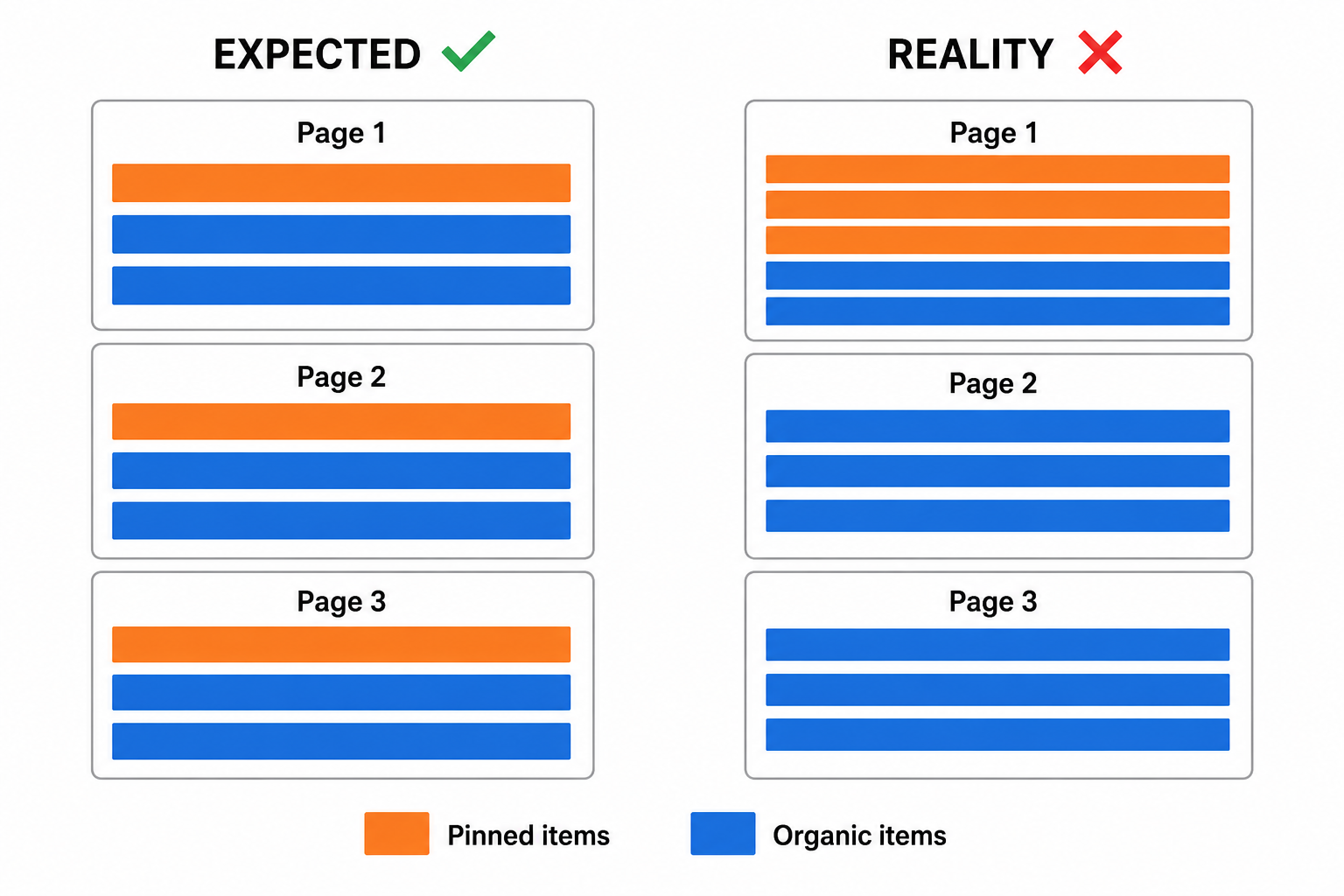
This completely broke my approach. The requirement was to show promoted items at consistent ratio across all pages, not just page 1. A user scrolling through page 5 should still see the same 1:2 ratio of promoted and organic result. I haven’t thinking about this scenario enough before I start implementing, and now I’m already in the middle of implementation when I realize the behavior is different with what I expected.
That moment when you already committed to approach and then find out it doesn’t work the way you think it work. Not fun haha.
The custom pagination solution
Since Elasticsearch could not handle this natively, I had to build custom in-code pagination. The idea is basically:
- Fetch promoted items and organic items separately, two different query
- In application code, interleave them at the desired ratio (1 promoted per 2 organic)
- Handle the pagination logic myself, tracking which promoted items and organic items have been shown across pages
- The hourly scheduler keeps the promoted items pool fresh
It was more work than I expected. What I thought would be a simple Elasticsearch query turned into custom pagination logic with two separate queries and interleaving algorithm. I was spending time on something that I initially think would be just a simple config on Elasticsearch side.
The tricky part is making sure the offset calculation is correct for both promoted and organic pool when user navigate between pages. Like if user is on page 3, I need to calculate how many promoted item and how many organic item already been shown on page 1 and 2, then fetch the next batch accordingly. Getting this math right actually takes me longer than I want to admit, there was edge case like when promoted items pool is smaller than what the ratio expects, so some page would have less promoted item and I need to fill the remaining slot with organic result instead.
The lesson
Read the docs more carefully, obviously. But more importantly, when you are planning to use a third-party feature for key part of your implementation, do a quick spike first. Write a throwaway script that tests the actual behavior with pagination, edge case, empty results. It would have taken me maybe an hour to discover this with spike, instead of discovering it mid-implementation when I already committed the timeline.
The name “Pinned Query” made me hear what I wanted to hear. The docs did describe the correct behavior, but I read them with my assumption already formed. I guess that’s something I need to be more careful about going forward.