Automating My Weekly Report Using Dify and Claude 3.5 Sonnet

Using self-hosted Dify with Claude 3.5 Sonnet to automate my weekly status report, from simple completion app to full workflow with issue tracker API integration.
In this post
The weekly report problem
So at my company, every developer need to write a weekly status report. The format has three main section: a Learning Section where you describe what you learned that week, P1 Results where you list what you achieved against your targets, and Next Week P1 where you set targets for the coming week.
Writing the P1 section is pretty straightforward, it’s mostly listing task and their status. But the Learning Section is the tedious part. You have to take your raw notes about what you learned and structuring them into a coherent writeup with action items. Every week it takes like 30 to 45 minutes for something that basically follows the same structure every time. I was thinking like, there must be a better way to doing this right?
Version 1: the completion app
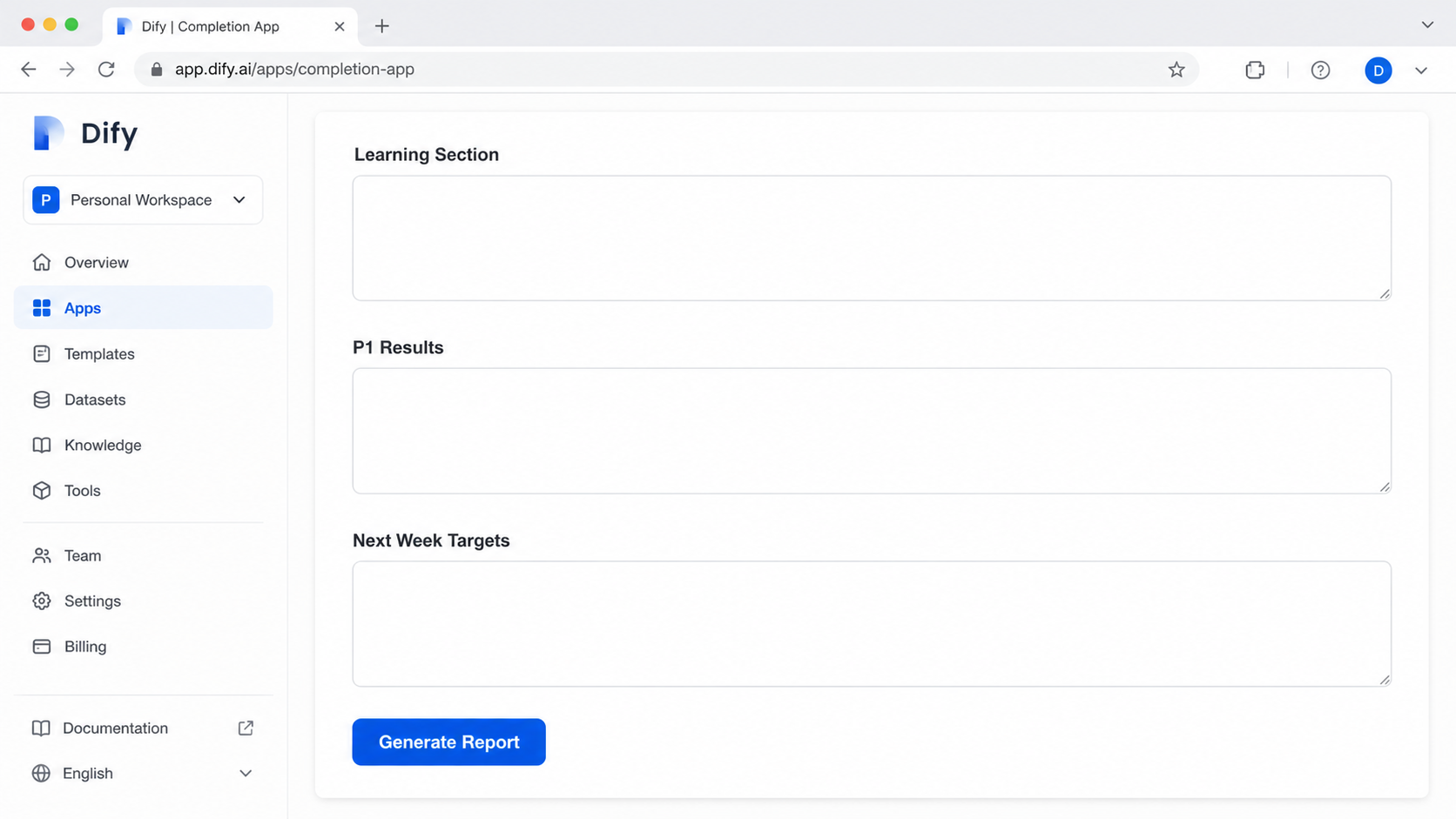
I had already been self-hosting Dify: an open-source LLM application development platform, on my server at dify.faldy.id for a while. I originally set it up to help my fiancée with her repetitive workload. Dify lets you build LLM-powered application with visual interface, prompt engineering without writing code. Pretty cool stuff.
So I created a Dify completion app for my weekly report. It has 3 paragraph inputs: the raw learning content, my P1 results, and next week P1 targets. A system prompt formats everything into the full report structure and elaborates the learning section with action items.
For the model I picked Claude 3.5 Sonnet which had just been released on 2024-10-22. Getting the prompt right took 7 iterations. The first few outputs were too generic, sounded like a textbook summary instead of personal weekly update. I keep tinkering around with the prompt, adjusting the tone, adding example of what I actually want it to sound like. By the end of the day I actually submitted the generated report that week. Dogfooding from day one haha.
It worked, but the annoying part was that I still had to manually go to our issue tracker, copy the ticket statuses, and paste them into the P1 result and next week field. I’m literally just copying data from one tool to another. The learning section was the only part that genuinely need me to write it. So why am I still doing the rest manually?
Version 2: Dify Workflows + issue tracker API
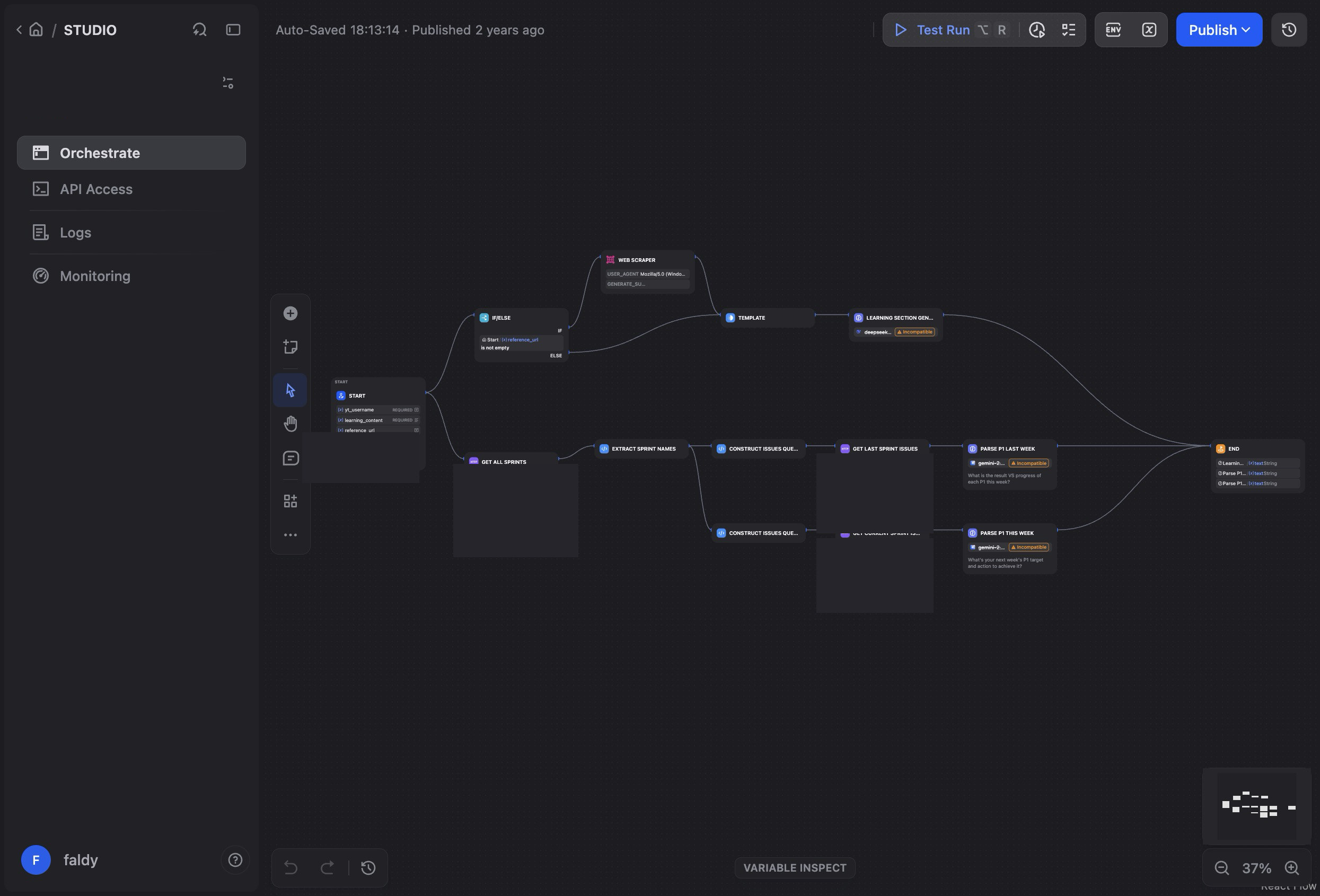
Two weeks later I rebuilt it. Instead of the simple completion app, I used Dify’s Workflow feature, you can visually chain together multiple steps: LLM calls, HTTP API requests, data transformations, conditional logic, all in a drag-and-drop canvas. No code needed.
The idea: instead of me manually copying ticket data, the workflow would call our issue tracker’s API directly. I would only need to type in my learning section.
“Can I really just plug in the API and let it pull everything?”
Actually, yes. I built the entire v2 in under 2 hours. And I was also learning the issue tracker’s REST API for the first time while doing it. The Dify workflow editor made it easy to test each API call step by step, inspect the JSON responses, and wire the data into the LLM prompt. I haven’t tinkering around with that particular API before so I was pretty impressed how fast it goes.
The workflow gathers 3 variables at the same time:
- Learning section: manual input from me
- P1 results: fetched automatically from the issue tracker API (tickets completed this sprint)
- Next week P1 targets: also fetched from the API (tickets planned for next sprint)
Then it passes everything to the LLM to generate the formatted report. I just write my learning notes and hit run. Not bad, right?
From personal hack to team tool
After using it for couple of weeks, I starting to share it with teammates. Since Dify lets you publish workflows as shareable web apps, they could just open the link and use it. What started as personal automation hack ended up being used by several people on my team.
I didn’t plan for that. I was just playing around and solving my own laziness haha. But then someone ask me how I generate my report so fast and I just send them the link. It’s funny how something you build for yourself actually useful for other people also.
Why self-hosting matters
I could have done this with ChatGPT or Claude.ai directly. But self-hosting Dify gives me few advantages: the data stays on my own server, weekly reports contain internal company information. There is no per-request cost beyond my existing server infrastructure. And I can iterate on the prompt freely without worrying about API bills.
The prototyping speed with tools like Dify changes what is worth automating. Two years ago this would have been a weekend coding project with Flask backend and everything. Now I can build it in couple hours and see if it actually works.
Sometimes the best project is the one that save you from doing the same boring thing every week.